 English
 Deutsch
 Polski
LukyDeluxe Audio Lab
MatchPoint
A free reference tool: reference via the sidechain, loudness matching short-term or across the whole passage, tonal balance in octave bands and as a live spectrum, click-free switching between mix, reference, difference and side.
How it works
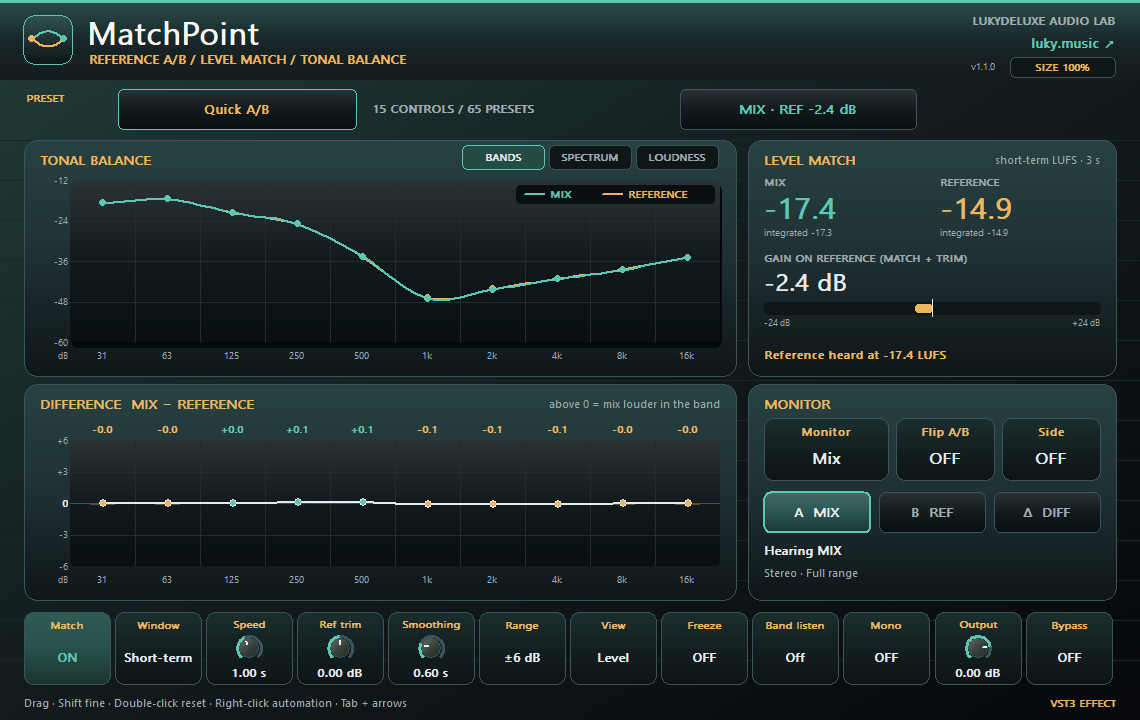
MatchPoint sits at the end of your mix bus, and the reference track arrives through the sidechain input. Level match measures both signals K-weighted and matches the reference to your mix, by up to ±24 dB. Match window chooses short-term loudness over 3 s or gated integrated loudness to BS.1770, measured over the same span in which the reference plays. Integrated stays steady across different arrangements: in a test, the match moved by 0.07 dB instead of 10.6 dB over the last 10 s. Ref trim lets you correct by hand, and Speed sets how quickly the match follows.
The left half has three views. BANDS shows mix and reference in ten octave bands from 31 Hz to 16 kHz with the deviation per band below. SPECTRUM shows both as a live spectrum with 96 bands from 20 Hz to 20 kHz. LOUDNESS shows the loudness history of the last 24 s, correlation and stereo width. Tonal view Shape removes the level difference and compares only the tonal shape. Smoothing calms the curves, Freeze holds them and Range scales the display.
Monitor switches between Mix, Reference and Difference without clicks, and Flip A/B swaps the sides. Band listen plays a single octave band, Mono checks the sum and Side listen the side signal. With no signal at the sidechain, your mix passes unchanged and the editor tells you so. 15 parameters and 65 presets for comparing, null tests, bands, mono, side, mix and master.
Features
- Loudness match up to ±24 dB, short-term or integrated, reference trim ±12 dB
- Tonal balance in 10 octave bands and a live spectrum from 20 Hz to 20 kHz
- 24 s loudness history, correlation and stereo width for mix and reference
- Monitor Mix, Reference or Difference, Flip A/B, Mono, Side listen, Band listen
- 15 parameters, 65 presets, zero latency
Ways to use it
- Match the low end of a trap mix against a released track
- Check the presence and air of a pop vocal against a reference in the spectrum
- Hear an EDM master next to the reference at equal loudness across the whole passage
Try it
- Put MatchPoint at the end of the mix bus, route the reference into the sidechain and load Quick A/B.
- Set Match window to Integrated, start playback and switch Monitor between Mix and Reference.
- Open SPECTRUM, choose Tonal view Shape and use Band listen or Side listen on the largest deviation.
Controls
Loudness match short-term or integrated up to ±24 dB, live spectrum, side listen, reference trim ±12 dB
Compatibility and notes
Free VST3 effect for the mix bus. MatchPoint does not load audio files; your host has to route the reference into the sidechain input. Integrated only measures while the reference plays and restarts when playback starts; there is no separate reset button. There is no time-offset compensation: Difference is a true null test only for sample-aligned signals. The Band listen filters do not sum to a flat response. Set Monitor to Mix or bypass the plugin before exporting. Latency 0. Projects from version 1.0.0 sound unchanged. Version 1.1.0 as VST3 for Windows x64, macOS Universal (arm64/x86_64) and Linux x86_64. The Mac edition is not notarized. No AU and no standalone application. Checked with pluginval at strictness 10 on Windows, macOS and Linux, plus REAPER 7.86 smoke tests on macOS (Apple Silicon) and Linux. All parameters support DAW automation; right-click opens the host's parameter menu where the host supports it.
Windows x64 and macOS Universal (Apple Silicon/Intel). The Mac edition is not notarized. Intel runtime testing is not documented; follow the host and installation notes for the individual download.
All sound knobs, switches and selection parameters support host automation. Right-click a parameter to open its menu where your DAW provides one.
Install
- Choose the ZIP for your operating system and extract it.
- Windows: copy the entire .vst3 bundle to C:\Program Files\Common Files\VST3.
- macOS: extract the ZIP and open the product .pkg in the Installer folder. Install for your current user. The Mac edition is not notarized; follow the Mac installation and security guide on this page.
- Linux x86_64: copy the complete .vst3 bundle from Plugin to ~/.vst3/ (create the directory if needed). The editor uses X11 via Cairo/XCB and requires a VST3 host with IRunLoop; Wayland requires XWayland. Native Wayland and Linux ARM64 are not supported. Built on Ubuntu 22.04; checked with pluginval (including the real-time check) and in native test hosts under Xvfb. A test in a Linux DAW is still pending.
- Rescan plugins in your 64-bit VST3 host. Load instruments on a MIDI track and effects in an audio insert.
Download details
- Windows x64 · VST3
- LukyDeluxe-matchpoint-1.1.0-windows-x64-b66b6859e75a.zip
- ZIP size
- 0.53 MiB
- SHA-256
- b66b6859e75a58980084981ee85f3862d02df6812b8e2918599cc3b00da2f99c
- macOS Universal · VST3
- LukyDeluxe-matchpoint-1.1.0-macos-universal-6a65c4ef180e.zip
- ZIP size
- 0.51 MiB
- SHA-256
- 6a65c4ef180efbbe97d39b77c8b21500070b6733f1bb0f247d44fc8df7f120b0
- Linux x86_64 · VST3
- LukyDeluxe-matchpoint-1.1.0-linux-x86_64-20fb2afffc8a.zip
- ZIP size
- 0.34 MiB
- SHA-256
- 20fb2afffc8adc52de92270d2036678a7dd5ae654a742cc8a9c276041de35766
Mac installation, step by step
The Mac edition of MatchPoint is not notarized by Apple. Its ZIP contains an installer for this specific plugin. Load the installed VST3 in a 64-bit DAW that supports VST3; it is not a standalone app.
1. Extract the ZIP and open the installer
- Choose the macOS Universal ZIP. Quit your DAW and extract the complete ZIP in Finder.
- In the extracted Installer folder, open matchpoint.pkg for MatchPoint. Do not launch the .vst3 as an app.
- If macOS blocks the installer because of an unidentified developer or missing Apple checks, follow section 2. Then reopen that same .pkg file.
- In Installer, choose installation for your current user account or home folder and finish the installation. The plugin destination is shown below.
- Restart your DAW, rescan its VST3 plugins and load MatchPoint there. Instruments use a MIDI track; effects use an audio insert.
Installation destination for your Mac user account
~/Library/Audio/Plug-Ins/VST3/
2. If macOS blocks the installer
Consider this exception only if you downloaded the file yourself from luky.music and trust that specific file. It applies to the product .pkg, not the .vst3 bundle.
- First try to open matchpoint.pkg. Dismiss the unidentified-developer or missing-Apple-check alert, for example with Done; wording varies by macOS version.
- Open System Settings → Privacy & Security and scroll down to Security. Find the recently blocked entry with the actual filename of this product .pkg.
- If Open Anyway is offered for that exact installer, select it and confirm any further opening request. Approve any Mac password or Touch ID request yourself, only in the macOS system dialog.
- Reopen the same .pkg if Installer does not appear automatically. Install only for your current user. Then restart the DAW and rescan the plugin.
No matching entry, or a different warning?
If the entry for the recently blocked .pkg remains absent, contact our support or your IT administrator on a managed Mac. If approving the .vst3 bundle only opens Finder and the DAW remains blocked, the plugin has not been successfully approved; use the product installer. Do not use this procedure to dismiss warnings about malware or a damaged or modified file: stop installation and investigate. Filenames and checksums are listed under Download details.
Keep Gatekeeper enabled. This guide requires neither Terminal commands to remove quarantine nor blanket approval for other software.
Apple’s guidance for safely opening downloaded software ↗