 English
 Deutsch
 Polski
LukyDeluxe Audio Lab
LukySynth PRO
The performance synth: 353 parameters, 56 presets, Chord Studio, four Motion lanes and a playable 36-key piano.
How it works
LukySynth PRO combines a three-oscillator synthesizer with tools for chords, rhythmic sound movement and immediate auditioning. Up to seven unison voices per oscillator, up to 16 polyphonic voices, sub and noise form the foundation. Two filters including Comb run in series or parallel, while three envelopes, three LFOs, eight modulation rows and four macros shape the sound. Memory Lattice adds a tuned resonant layer with Rotation and Drift. In Poly mode, Chord Studio turns single notes into voicings with inversions, extra semitone spacing and upward or downward strums. Scale quantization can also apply to Mono/Legato and the chord-following Memory tuning.
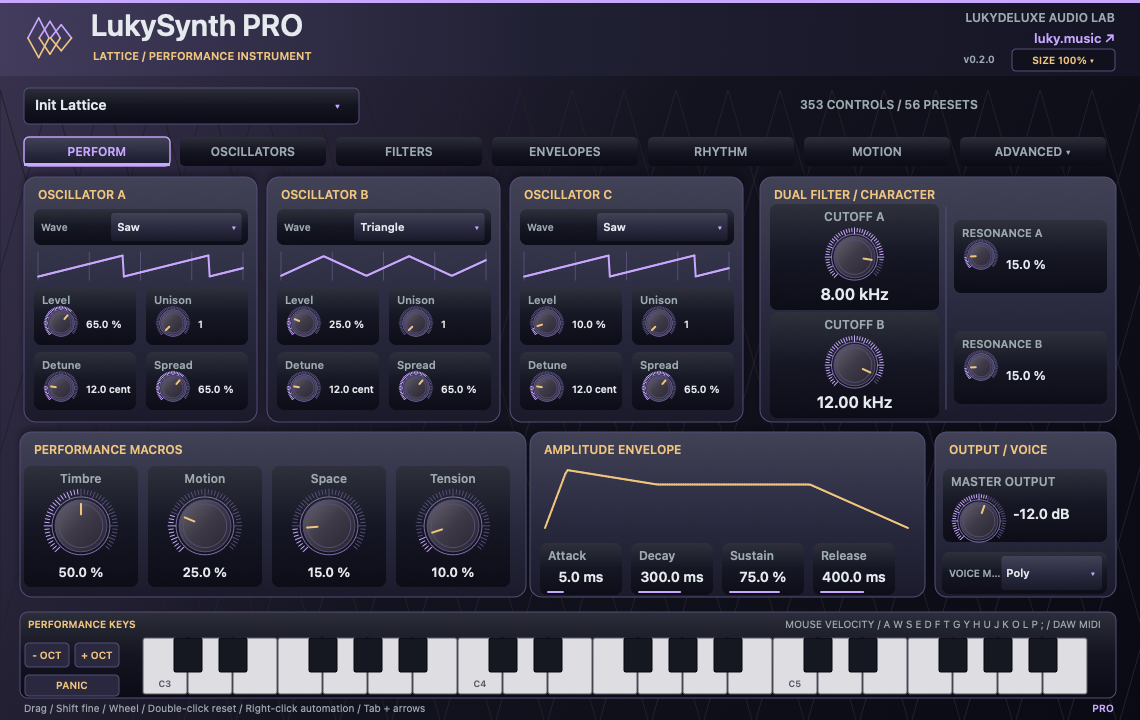
Motion Studio controls four lanes of up to 16 shared steps for cutoff, pan, accent and pitch. Note division, swing, phase, smoothing, direction and individual lane depths turn a held sound into a moving phrase. Drive, chorus, stereo delay and algorithmic Space complete the chain; FX Finish adds separate ducking amounts for delay and Space, plus bass and treble tone controls. The violet-and-gold interface includes a 36-key piano for mouse or computer-keyboard playing and for displaying incoming DAW MIDI notes. Across its sections, 353 parameters and 56 factory presets provide starting points for leads, basses, pads, arps, keys and effects. The performance view brings together three oscillator areas, two filter cutoffs, resonance, four macros, amp and piano with 29 direct controls. Original violet-and-gold gradients and the Lattice mark define the interface; tabs and Advanced reach all 353 parameters.
Features
- Chord Studio: Major, Minor, Sus 2, Sus 4, Major 7, Minor 7, Dominant 7, Power, Octaves and Minor 9, plus Off
- Four Motion lanes with 16 editable cutoff, pan, accent and pitch values each; a shared length of 1–16 steps
- 36-key piano with mouse velocity, glissando, focused computer-keyboard input, DAW MIDI display, octave controls and PANIC
- 353 visible sound parameters across multiple sections; 92 added since version 0.1.0
- 56 factory presets: the original 16 plus 40 new lead, bass, pad, arp, keys and FX sounds
- Three main oscillators with eight waveforms and up to seven unison voices per oscillator
- Up to 16 polyphonic voices, Mono/Legato, sub and noise; chord notes share the selected polyphony
- Two filters including Comb, eight profiles per filter, series/parallel routing and balance
- Three envelopes, three LFOs, eight modulation rows, four macros and Memory Lattice with Rotation and Drift
- Inversions 0–3 and Open Voicing with 0–24 semitones of additional spacing
- Sample-timed strum gaps of 0–80 ms per note, Up/Down direction and Velocity Falloff
- Scale quantization in twelve roots: Major, Natural minor, Dorian, Mixolydian and Minor pentatonic, plus Off
- Twelve tempo-synchronized note divisions, Swing, Phase and Forward, Reverse or Ping-pong direction
- 0.1–500 ms Motion Smoothing, separate lane depths and Filter A, Filter B or Both as the cutoff target
- Up to five octaves of cutoff modulation depth and pitch steps from −24 to +24 semitones
- 16-step Trance Gate and up-to-four-octave arpeggiator with per-step pitch, accent and chance
- Drive, chorus, stereo delay and algorithmic Space
- FX Finish: separate Delay/Space ducking amounts, a shared 20–1,500 ms release and adjustable sensitivity
- Bass and treble tone controls of ±12 dB each, with separate frequency controls
- The performance view brings together three oscillator areas, two filter cutoffs, resonance, four macros, amp and piano with 29 direct controls. Original violet-and-gold gradients and the Lattice mark define the interface; tabs and Advanced reach all 353 parameters.
Ways to use it
- Develop chord leads and rhythmic voicings from single MIDI notes
- Animate sustained pads with cutoff, pan, accent and pitch steps
- Shape bass and arp patches with scale selection, swing and staggered strums
- Let delay and reverb recede at the attack and bloom between notes
- Audition presets inside the editor, then develop their automation in the DAW
Try it
- Load LukySynth PRO as a VST3 instrument and choose one of its 56 factory presets. Start with modest polyphony and unison settings.
- Play through your MIDI track or the 36-key piano. Computer-keyboard playing requires editor focus; the key sequence is A W S E D F T G Y H U J K O L P ;.
- In Poly mode, choose a Chord Studio voicing. Compare Inversion, Open Voicing, Strum direction and the per-note gap.
- Enable Scale quantize if wanted and choose a root. Quantization can alter the notes and intervals of a generated voicing.
- Enable Motion Studio, select a length and note division, then edit the four Motion sections. Raise the relevant Depth so that the steps affect the sound.
- Shape movement with Swing, Smoothing and Direction. Choose the required filter target for cutoff.
- Blend delay and Space, then adjust ducking, release, sensitivity, bass and treble in FX Finish.
- Right-click for the parameter menu where your DAW provides it. Check level and CPU, then save your patch; PANIC releases held notes.
Controls
353 parameters · 56 presets · OSC A/B/C · Sub/Noise · Filter A/B · envelopes · LFO 1/2/3 · Trance Gate · Arpeggiator steps · Drive/Chorus/Delay/Space · Memory Lattice · modulation matrix · Chord Studio · Motion Studio · Motion Cutoff/Pan/Accent/Pitch · FX Finish · 36-key performance piano
Compatibility and notes
Early Access, version 0.2.0. 353 counts sound parameters including switches and sequence values; they are spread across sections rather than all shown at once. Chord voicings apply to polyphonic playing and arpeggiator triggers; scale quantization also works in Mono/Legato. Generated chord notes use the normal polyphony allocation of up to 16 voices. The 36 displayed piano keys and the shorter computer-key sequence cover different playing ranges; keyboard layout and host key forwarding can affect operation. Incoming DAW MIDI notes are shown within the currently visible piano range. High polyphony and unison can place substantial demand on the CPU; there is no general performance guarantee for maximum settings. No sample/wavetable import, MPE, multitimbrality, AU or standalone application. Project state saves sound parameters, not active voices, held piano keys or resonator/effect history. Nonlinear stages are not fully oversampled. VST3 for Windows x64 and macOS Universal (arm64/x86_64). The Mac edition remains unnotarized. All sound parameters support DAW automation; right-click menus are supplied by the host.
Windows x64 and macOS Universal (Apple Silicon/Intel). The Mac edition is not notarized. Intel runtime testing is not documented; follow the host and installation notes for the individual download.
All sound knobs, switches and selection parameters support host automation. Right-click a parameter to open its menu where your DAW provides one.
Install
- Choose the ZIP for your operating system and extract it.
- Windows: copy the entire .vst3 bundle to C:\Program Files\Common Files\VST3.
- macOS: extract the ZIP and open the product .pkg in the Installer folder. Install for your current user. The Mac edition is not notarized; follow the Mac installation and security guide on this page.
- Linux x86_64: copy the complete .vst3 bundle from Plugin to ~/.vst3/ (create the directory if needed). The editor uses X11 via Cairo/XCB and requires a VST3 host with IRunLoop; Wayland requires XWayland and a compatible host. Native Wayland and Linux ARM64 are not supported. Built on Ubuntu 22.04; exact library requirements are in INSTALL.txt in the Linux ZIP. Checked in native test hosts/Xvfb and pluginval; not yet tested in a Linux DAW. Not every Linux host or distribution has been tested.
- Rescan plugins in your 64-bit VST3 host. Load instruments on a MIDI track and effects in an audio insert.
Download details
- Windows x64 · VST3
- LukyDeluxe-lukysynth-pro-0.2.0-windows-x64-5159b1002dd9.zip
- ZIP size
- 0.42 MiB
- SHA-256
- 5159b1002dd9fc0726ad84e3e6644b53d87eff75b9a6e8c137d4fde34073b9f5
- macOS Universal · VST3
- LukyDeluxe-lukysynth-pro-0.2.0-macos-universal-6e7ea61590b6.zip
- ZIP size
- 0.27 MiB
- SHA-256
- 6e7ea61590b6a871bfbca2bf76e92b3fbffba3cb40ee995e0da425fac30d8d05
- Linux x86_64 · VST3
- LukyDeluxe-lukysynth-pro-0.2.0-linux-x86_64-f145b6880f02.zip
- ZIP size
- 0.17 MiB
- SHA-256
- f145b6880f027603a38cec3c715a1f33bfbbdf17afae19abdb6c20b505a4ae23
Mac installation, step by step
The Mac edition of LukySynth PRO is not notarized by Apple. Its ZIP contains an installer for this specific plugin. Load the installed VST3 in a 64-bit DAW that supports VST3; it is not a standalone app.
1. Extract the ZIP and open the installer
- Choose the macOS Universal ZIP. Quit your DAW and extract the complete ZIP in Finder.
- In the extracted Installer folder, open lukysynth-pro.pkg for LukySynth PRO. Do not launch the .vst3 as an app.
- If macOS blocks the installer because of an unidentified developer or missing Apple checks, follow section 2. Then reopen that same .pkg file.
- In Installer, choose installation for your current user account or home folder and finish the installation. The plugin destination is shown below.
- Restart your DAW, rescan its VST3 plugins and load LukySynth PRO there. Instruments use a MIDI track; effects use an audio insert.
Installation destination for your Mac user account
~/Library/Audio/Plug-Ins/VST3/
2. If macOS blocks the installer
Consider this exception only if you downloaded the file yourself from luky.music and trust that specific file. It applies to the product .pkg, not the .vst3 bundle.
- First try to open lukysynth-pro.pkg. Dismiss the unidentified-developer or missing-Apple-check alert, for example with Done; wording varies by macOS version.
- Open System Settings → Privacy & Security and scroll down to Security. Find the recently blocked entry with the actual filename of this product .pkg.
- If Open Anyway is offered for that exact installer, select it and confirm any further opening request. Approve any Mac password or Touch ID request yourself, only in the macOS system dialog.
- Reopen the same .pkg if Installer does not appear automatically. Install only for your current user. Then restart the DAW and rescan the plugin.
No matching entry, or a different warning?
If the entry for the recently blocked .pkg remains absent, contact our support or your IT administrator on a managed Mac. If approving the .vst3 bundle only opens Finder and the DAW remains blocked, the plugin has not been successfully approved; use the product installer. Do not use this procedure to dismiss warnings about malware or a damaged or modified file: stop installation and investigate. Filenames and checksums are listed under Download details.
Keep Gatekeeper enabled. This guide requires neither Terminal commands to remove quarantine nor blanket approval for other software.
Apple’s guidance for safely opening downloaded software ↗