 English
 Deutsch
 Polski
LukyDeluxe Audio Lab
Luky SuperSaw PRO
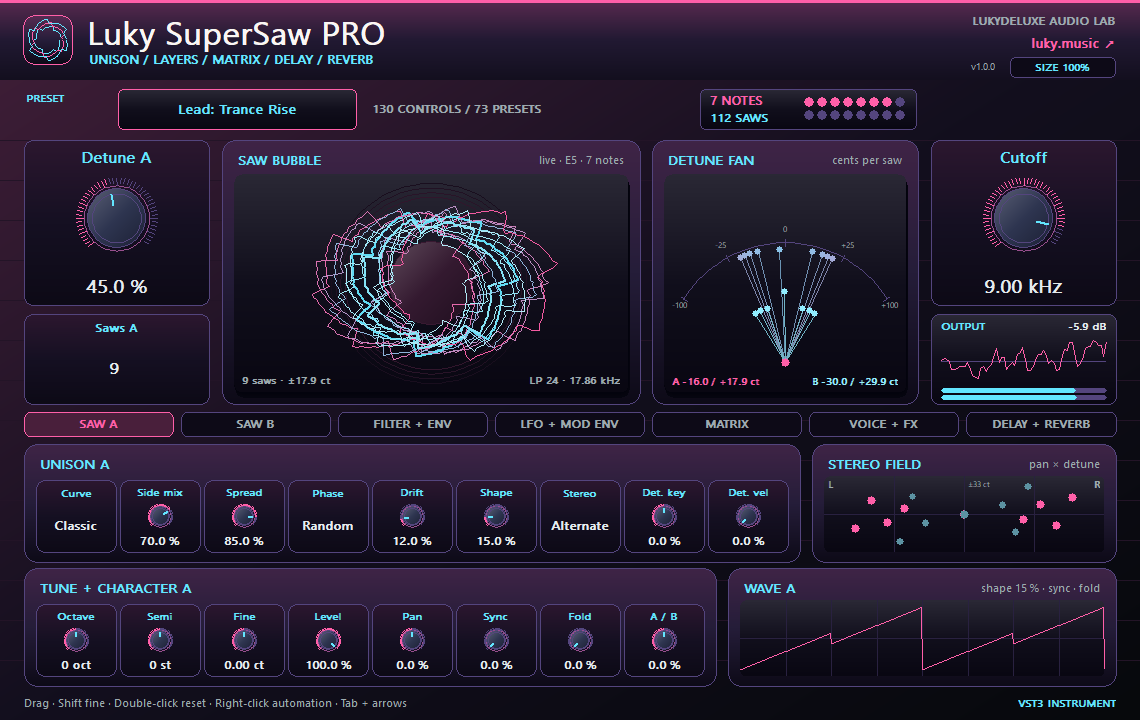
Everything in Luky SuperSaw plus a second layer with up to 16 more saws, sync and wavefolder, three LFOs, two mod envelopes, an eight-slot matrix and a built-in effects chain through delay and reverb.
How it works
Luky SuperSaw PRO includes every feature of the free edition and builds on it. Two layers, A and B, each hold 1 to 16 saws with their own detune curve, side mix, spread, phase, drift and shape, plus octave, semitone, fine tune, level and pan. Hard sync up to 8x and a sine wavefolder per saw add edge, and Balance mixes the layers. Detune key and Detune vel change the detune with pitch and velocity, and the noise gets its own Tone control.
Three LFOs (free or tempo-synced down to 1/32, including dotted and triplet) and two mod envelopes feed an eight-slot matrix. Sources include velocity, key, mod wheel, channel aftertouch and random; targets range from pitch, detune and spread through cutoff, fold and sync to the effect mixes. After the filter come chorus/ensemble, drive with three curves, a two-shelf EQ, width, a delay with tempo sync, ping-pong and filters in the feedback path, and a reverb with pre-delay and damping. Each stage stays out of the signal path while it is neutral. 130 parameters on seven pages, 73 presets for leads, pads, plucks, stabs, basses, walls, keys and FX.
Features
- Every FREE feature plus layer B: up to 32 saws per note
- Hard sync up to 8x and wavefolder per layer, detune by key and velocity
- Three LFOs, two mod envelopes, eight-slot matrix including aftertouch
- Chorus, drive, EQ, width, tempo-sync delay and reverb, 130 parameters, 73 presets
Ways to use it
- Stacked lead with echoes for the peak of a trance track
- Pad that opens with aftertouch and the mod wheel
- Short chord stabs with ping-pong delay for a club track
Try it
- Load Supersaw Wall and play a chord; the second family of rings in the saw bubble shows layer B.
- Raise Sync on SAW A and Fold on SAW B and hear the sound gain bite.
- In MATRIX, route aftertouch to cutoff, then set the effect mixes on DELAY + REVERB.
Controls
130 parameters · 73 presets · two saw layers A/B (1–16 saws each) · sync/fold · sub/noise · filter + envelopes · 3 LFOs · 2 mod envelopes · 8-slot matrix incl. aftertouch · chorus · drive · EQ · width · tempo-sync delay · reverb · saw bubble
Compatibility and notes
VST3 instrument for a MIDI track, latency 0. Contains every Luky SuperSaw parameter with the same values; the six free presets sound identical here. Up to 16 notes at once; beyond that a new note takes over a voice with a short fade. Both layers allow up to 32 saws per note; at full polyphony with all effects the CPU load is clearly higher than in the free edition. Alias suppression adds an internal delay of 2 samples (0.04 ms at 48 kHz) that is not reported as latency. Changing Saws or Octave while notes are held jumps audibly. Global matrix targets (drive, effect mixes, LFO 1 rate) follow the latest note. The delay display calculates synced times at 120 BPM; the sound follows the host tempo. Original design that does not emulate any specific unit. Version 1.0.0 as VST3 for Windows x64, macOS Universal (arm64/x86_64) and Linux x86_64. The Mac edition is not notarized. No AU and no standalone application. Checked with pluginval at strictness 10 on Windows, macOS and Linux, plus REAPER 7.86 smoke tests on macOS (Apple Silicon) and Linux. All parameters support DAW automation; right-click opens the host's parameter menu where the host supports it.
Windows x64 and macOS Universal (Apple Silicon/Intel). The Mac edition is not notarized. Intel runtime testing is not documented; follow the host and installation notes for the individual download.
All sound knobs, switches and selection parameters support host automation. Right-click a parameter to open its menu where your DAW provides one.
Install
- Choose the ZIP for your operating system and extract it.
- Windows: copy the entire .vst3 bundle to C:\Program Files\Common Files\VST3.
- macOS: extract the ZIP and open the product .pkg in the Installer folder. Install for your current user. The Mac edition is not notarized; follow the Mac installation and security guide on this page.
- Linux x86_64: copy the complete .vst3 bundle from Plugin to ~/.vst3/ (create the directory if needed). The editor uses X11 via Cairo/XCB and requires a VST3 host with IRunLoop; Wayland requires XWayland. Native Wayland and Linux ARM64 are not supported. Built on Ubuntu 22.04; checked with pluginval (including the real-time check) and in native test hosts under Xvfb. A test in a Linux DAW is still pending.
- Rescan plugins in your 64-bit VST3 host. Load instruments on a MIDI track and effects in an audio insert.
Download details
- Windows x64 · VST3
- LukyDeluxe-luky-supersaw-pro-1.0.0-windows-x64-a4111ae778ef.zip
- ZIP size
- 0.57 MiB
- SHA-256
- a4111ae778ef9e150d31c819be9d8d2f7b02041d069940421d461c5f88a495ca
- macOS Universal · VST3
- LukyDeluxe-luky-supersaw-pro-1.0.0-macos-universal-fe86811a748f.zip
- ZIP size
- 0.57 MiB
- SHA-256
- fe86811a748f806dde5a6c420c9b19355f9d4c803a3e3bea1c46406877a601ab
- Linux x86_64 · VST3
- LukyDeluxe-luky-supersaw-pro-1.0.0-linux-x86_64-53acd79e5de0.zip
- ZIP size
- 0.38 MiB
- SHA-256
- 53acd79e5de013307828073f956c58c20fc1d44d62e89fa8e5b10b473572fd8f
Mac installation, step by step
The Mac edition of Luky SuperSaw PRO is not notarized by Apple. Its ZIP contains an installer for this specific plugin. Load the installed VST3 in a 64-bit DAW that supports VST3; it is not a standalone app.
1. Extract the ZIP and open the installer
- Choose the macOS Universal ZIP. Quit your DAW and extract the complete ZIP in Finder.
- In the extracted Installer folder, open luky-supersaw-pro.pkg for Luky SuperSaw PRO. Do not launch the .vst3 as an app.
- If macOS blocks the installer because of an unidentified developer or missing Apple checks, follow section 2. Then reopen that same .pkg file.
- In Installer, choose installation for your current user account or home folder and finish the installation. The plugin destination is shown below.
- Restart your DAW, rescan its VST3 plugins and load Luky SuperSaw PRO there. Instruments use a MIDI track; effects use an audio insert.
Installation destination for your Mac user account
~/Library/Audio/Plug-Ins/VST3/
2. If macOS blocks the installer
Consider this exception only if you downloaded the file yourself from luky.music and trust that specific file. It applies to the product .pkg, not the .vst3 bundle.
- First try to open luky-supersaw-pro.pkg. Dismiss the unidentified-developer or missing-Apple-check alert, for example with Done; wording varies by macOS version.
- Open System Settings → Privacy & Security and scroll down to Security. Find the recently blocked entry with the actual filename of this product .pkg.
- If Open Anyway is offered for that exact installer, select it and confirm any further opening request. Approve any Mac password or Touch ID request yourself, only in the macOS system dialog.
- Reopen the same .pkg if Installer does not appear automatically. Install only for your current user. Then restart the DAW and rescan the plugin.
No matching entry, or a different warning?
If the entry for the recently blocked .pkg remains absent, contact our support or your IT administrator on a managed Mac. If approving the .vst3 bundle only opens Finder and the DAW remains blocked, the plugin has not been successfully approved; use the product installer. Do not use this procedure to dismiss warnings about malware or a damaged or modified file: stop installation and investigate. Filenames and checksums are listed under Download details.
Keep Gatekeeper enabled. This guide requires neither Terminal commands to remove quarantine nor blanket approval for other software.
Apple’s guidance for safely opening downloaded software ↗