 English
 Deutsch
 Polski
LukyDeluxe Audio Lab
GrooveGlue
A compressor with a 16-step groove release, a character pad between Clean, VCA, Opto and FET, color saturation, a parallel EQ, Target GR and Transient keep. For drum buses, bass, vocals and the mix bus.
How it works
GrooveGlue lengthens or shortens the release time step by step in song tempo. Each of the 16 bars multiplies the release by ×0.25 to ×4, Depth sets the amount and Swing delays every second step. A bus can pump in eighth notes without routing a kick to a sidechain. When the transport is stopped, an internal clock keeps counting at host tempo. The Groove page shows the 16 steps at full size, with a swing-aware playhead and the gain reduction of the last cycle.
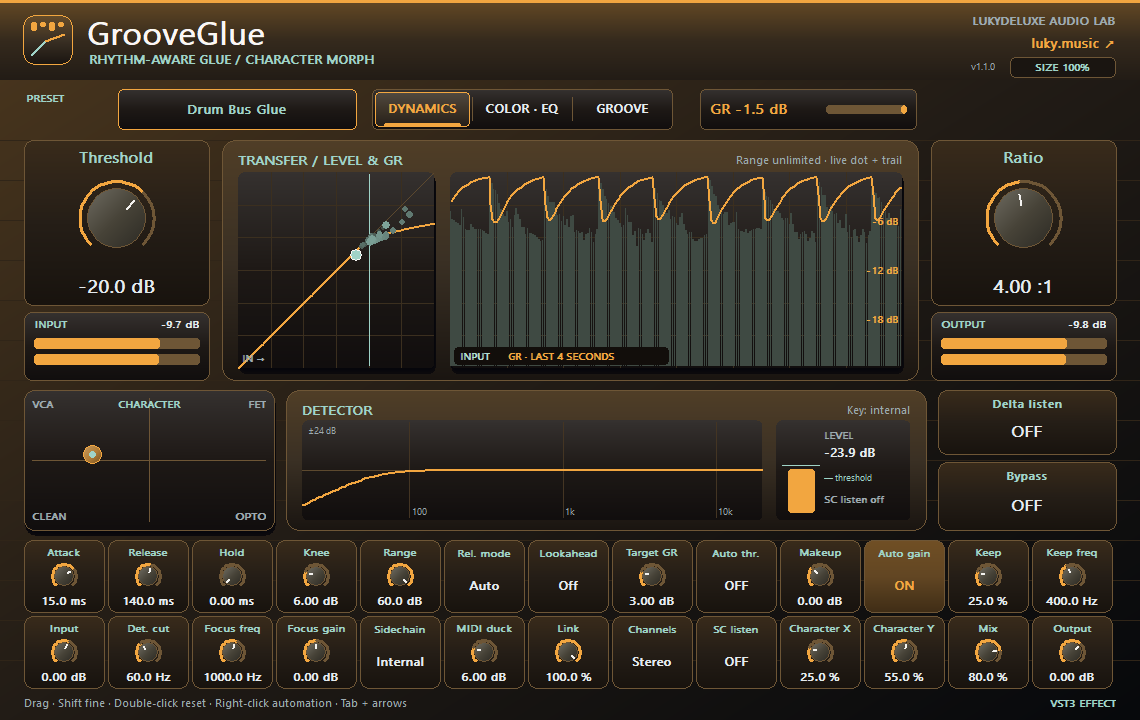
The character pad blends smoothly between Clean, VCA, Opto and FET; they change the detector, knee, feedback amount, release behaviour and saturation. Target GR slowly moves the threshold, Range limits the reduction to 1–60 dB and Hold holds the release for up to 500 ms. Transient keep lets attacks above an adjustable frequency pass the compressor. The detector has a low cut and a focus bell and listens internally, to the sidechain input or to MIDI notes; Sidechain listen lets you hear exactly that signal.
Version 1.1.0 adds a color stage for the compressed signal: Warm, Tape or Edge with up to 24 dB of drive, before or after the compressor, with Tone, Color mix and 4× oversampling. A parallel EQ trims the compressed part before the mix with Wet low cut and Wet high cut. The Dynamics page shows the transfer curve with a live dot plus input level and gain reduction for the last four seconds. 56 parameters and 100 presets are sorted by use, from drums, vocal, bass and mix bus to hip-hop, house, techno, rock, film and podcast.
Features
- 16-step groove release, ×0.25–×4 per step, 11 note divisions and swing
- Character pad: smooth blend of Clean, VCA, Opto and FET
- Warm, Tape or Edge color stage, 0–24 dB drive, 4× oversampling, pre or post compressor
- Ratio 1:1–20:1, attack 0.05–200 ms, release 5–2000 ms, Range, Hold and Target GR up to 12 dB
- Internal, external or MIDI sidechain with Sidechain listen; Stereo, Mid, Side, Mid + Side
- Parallel EQ for the compressed part, 56 parameters and 100 presets
Ways to use it
- A house drum bus that breathes between the kicks
- Pump EDM drop pads in rhythm without a kick sidechain
- Parallel drum compression with tape color and softened highs in the wet part
- Glue a mix bus at about 2 dB of reduction while the snare attack stays open
Try it
- Load Groove Pump 1/8 on a pad or synth group and start playback.
- Switch to the Groove page, drag the bars and lower Depth until the pumping fits the song.
- Open Color · EQ, choose Tape, raise Color drive and Color mix, and use Delta listen to hear what the compressor removes.
Controls
16-step groove release, Warm/Tape/Edge color stage with 4× oversampling, parallel wet EQ, Range and Hold
Compatibility and notes
GrooveGlue is a compressor, not a limiter; it has no fixed output ceiling. The four character corners and the three color types describe behaviours and do not emulate any specific unit. The character pad saturation runs without oversampling; the color stage uses 4×. When Color sits before the compressor, the detector still hears the uncolored signal. External requires your host to route a signal into the sidechain input. Target GR reacts slowly and only to signals above −50 dB. Lookahead (Off, 0.5, 1, 2 or 5 ms) adds the same latency, which is reported to the host; without lookahead it is 0 ms. Projects saved with version 1.0.0 sound unchanged; the new controls start in a neutral position. Version 1.1.0 as VST3 for Windows x64, macOS Universal (arm64/x86_64) and Linux x86_64. Checked with pluginval at strictness 10 on Windows, macOS and Linux, plus REAPER 7.86 smoke tests on macOS (Apple Silicon) and Linux. The Mac edition is not notarized. No AU or standalone application. All parameters support DAW automation. Right-click opens the host-supplied parameter menu where the host supports this feature.
Windows x64 and macOS Universal (Apple Silicon/Intel). The Mac edition is not notarized. Intel runtime testing is not documented; follow the host and installation notes for the individual download.
All sound knobs, switches and selection parameters support host automation. Right-click a parameter to open its menu where your DAW provides one.
Install
- Choose the ZIP for your operating system and extract it.
- Windows: copy the entire .vst3 bundle to C:\Program Files\Common Files\VST3.
- macOS: extract the ZIP and open the product .pkg in the Installer folder. Install for your current user. The Mac edition is not notarized; follow the Mac installation and security guide on this page.
- Linux x86_64: copy the complete .vst3 bundle from Plugin to ~/.vst3/ (create the directory if needed). The editor uses X11 via Cairo/XCB and requires a VST3 host with IRunLoop; Wayland requires XWayland. Native Wayland and Linux ARM64 are not supported. Built on Ubuntu 22.04; checked with pluginval (including the real-time check) and in native test hosts under Xvfb. A test in a Linux DAW is still pending.
- Rescan plugins in your 64-bit VST3 host. Load instruments on a MIDI track and effects in an audio insert.
Download details
- Windows x64 · VST3
- LukyDeluxe-grooveglue-1.1.0-windows-x64-9ff5c8707916.zip
- ZIP size
- 0.53 MiB
- SHA-256
- 9ff5c87079164c0c4fe253b7830f537fb784261ed815fe8b6a7178628089d3b3
- macOS Universal · VST3
- LukyDeluxe-grooveglue-1.1.0-macos-universal-c7498efcf233.zip
- ZIP size
- 0.51 MiB
- SHA-256
- c7498efcf2335ceed306a4f163479319d5bc0203b471d13abf4b7d0d5d60bede
- Linux x86_64 · VST3
- LukyDeluxe-grooveglue-1.1.0-linux-x86_64-83ba69ce7673.zip
- ZIP size
- 0.35 MiB
- SHA-256
- 83ba69ce767342692a961ebf08e987240e7f4d869c848c09205db0d0c9f12a1d
Mac installation, step by step
The Mac edition of GrooveGlue is not notarized by Apple. Its ZIP contains an installer for this specific plugin. Load the installed VST3 in a 64-bit DAW that supports VST3; it is not a standalone app.
1. Extract the ZIP and open the installer
- Choose the macOS Universal ZIP. Quit your DAW and extract the complete ZIP in Finder.
- In the extracted Installer folder, open grooveglue.pkg for GrooveGlue. Do not launch the .vst3 as an app.
- If macOS blocks the installer because of an unidentified developer or missing Apple checks, follow section 2. Then reopen that same .pkg file.
- In Installer, choose installation for your current user account or home folder and finish the installation. The plugin destination is shown below.
- Restart your DAW, rescan its VST3 plugins and load GrooveGlue there. Instruments use a MIDI track; effects use an audio insert.
Installation destination for your Mac user account
~/Library/Audio/Plug-Ins/VST3/
2. If macOS blocks the installer
Consider this exception only if you downloaded the file yourself from luky.music and trust that specific file. It applies to the product .pkg, not the .vst3 bundle.
- First try to open grooveglue.pkg. Dismiss the unidentified-developer or missing-Apple-check alert, for example with Done; wording varies by macOS version.
- Open System Settings → Privacy & Security and scroll down to Security. Find the recently blocked entry with the actual filename of this product .pkg.
- If Open Anyway is offered for that exact installer, select it and confirm any further opening request. Approve any Mac password or Touch ID request yourself, only in the macOS system dialog.
- Reopen the same .pkg if Installer does not appear automatically. Install only for your current user. Then restart the DAW and rescan the plugin.
No matching entry, or a different warning?
If the entry for the recently blocked .pkg remains absent, contact our support or your IT administrator on a managed Mac. If approving the .vst3 bundle only opens Finder and the DAW remains blocked, the plugin has not been successfully approved; use the product installer. Do not use this procedure to dismiss warnings about malware or a damaged or modified file: stop installation and investigate. Filenames and checksums are listed under Download details.
Keep Gatekeeper enabled. This guide requires neither Terminal commands to remove quarantine nor blanket approval for other software.
Apple’s guidance for safely opening downloaded software ↗