 English
 Deutsch
 Polski
LukyDeluxe Audio Lab
FinalForge Lite
A free finish for the master: tilt, mono bass, high width, a 4× clipper, a true-peak limiter with three characters, LUFS and LRA metering, a stereo check and a preview of how much streaming platforms turn your song down.
How it works
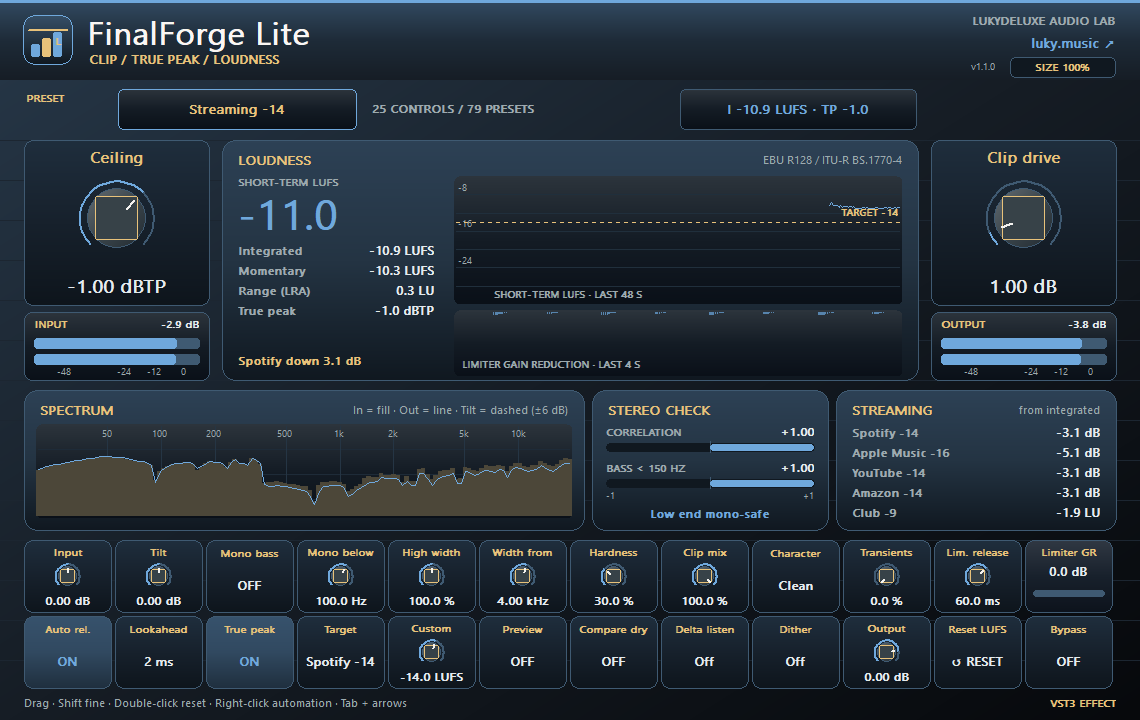
FinalForge Lite is the end of the FinalForge chain without the multiband section. Tilt tips the sound around 1 kHz by up to ±6 dB. Mono bass makes the lows mono below 20 to 300 Hz, and High width narrows or widens the highs above a chosen frequency. Transient preserve lifts attacks before the clipper. The clipper runs with 4× oversampling and rounds off peaks with Clip drive, Hardness and Clip mix. A lookahead limiter with true-peak detection then holds the chosen Ceiling in the Clean, Punch or Loud character. Delta listen plays only what the clipper or limiter removes.
The readout shows short-term LUFS, integrated, momentary, LRA and the highest true peak, plus a 48-second short-term history with a target line and the limiter's gain reduction. A spectrum compares input and output. STEREO CHECK measures the correlation overall and below 150 Hz and reports mono-safe, wide or out of phase. STREAMING PREVIEW estimates from the integrated loudness how much quieter your song would play for five references between −16 and −9 LUFS. Preview lets you hear the chosen target; Compare dry plays the original at matched loudness. The measurement restarts when the transport starts or with Reset LUFS.
Version 1.1.0 extends Lite to 25 parameters and 79 presets: loudness targets, safe settings, clip and limit templates, and presets for club, hip-hop, EDM, rock, pop, acoustic, voice and stems.
Features
- Clipper with 4× oversampling, 0–12 dB drive, hardness and mix
- Clean, Punch or Loud true-peak limiter: ceiling −3 to 0 dBTP, lookahead 1–5 ms, auto release
- ±6 dB tilt, mono bass 20–300 Hz, high width 0–200 % and transient preserve
- Short-term, integrated, momentary, LRA, maximum true peak and LUFS history
- Spectrum and stereo check with overall and sub-150 Hz correlation
- Target preview, loudness-matched compare, 16/24-bit dither, 25 parameters and 79 presets
Ways to use it
- Keep a trap or pop bounce safely below −1 dBTP
- Check whether a loud EDM master gets turned down on streaming platforms
- Make sure the bass stays mono-compatible before export
- Bring demo mixes to a consistent loudness before sending them out
Try it
- Load Streaming -14 on the master bus and play the song from the start.
- Raise Clip drive in small steps, watch the short-term LUFS and keep Ceiling at −1 dBTP.
- Check the correlation below 150 Hz in STEREO CHECK, switch on Mono bass if needed and compare with Compare dry.
Controls
4× clipper, Clean/Punch/Loud true-peak limiter, tilt, mono bass, high width and stereo check
Compatibility and notes
Free VST3 effect for the master or an audio insert. Lite has no multiband dynamics, no per-band saturation and no low or high shelves; those are in FinalForge. High width splits with a first-order filter, so just above Width from the width only partly applies. The loudness targets are reference values, not official platform specifications, and the meter is not a certified measuring device. Latency: 4 ms at 48 kHz with the default 2 ms lookahead, 3–7 ms depending on lookahead. Projects saved with version 1.0.0 sound unchanged; the new controls start in a neutral position. Version 1.1.0 as VST3 for Windows x64, macOS Universal (arm64/x86_64) and Linux x86_64. Checked with pluginval at strictness 10 on Windows, macOS and Linux, plus REAPER 7.86 smoke tests on macOS (Apple Silicon) and Linux. The Mac edition is not notarized. No AU or standalone application. All parameters support DAW automation. Right-click opens the host-supplied parameter menu where the host supports this feature.
Windows x64 and macOS Universal (Apple Silicon/Intel). The Mac edition is not notarized. Intel runtime testing is not documented; follow the host and installation notes for the individual download.
All sound knobs, switches and selection parameters support host automation. Right-click a parameter to open its menu where your DAW provides one.
Install
- Choose the ZIP for your operating system and extract it.
- Windows: copy the entire .vst3 bundle to C:\Program Files\Common Files\VST3.
- macOS: extract the ZIP and open the product .pkg in the Installer folder. Install for your current user. The Mac edition is not notarized; follow the Mac installation and security guide on this page.
- Linux x86_64: copy the complete .vst3 bundle from Plugin to ~/.vst3/ (create the directory if needed). The editor uses X11 via Cairo/XCB and requires a VST3 host with IRunLoop; Wayland requires XWayland. Native Wayland and Linux ARM64 are not supported. Built on Ubuntu 22.04; checked with pluginval (including the real-time check) and in native test hosts under Xvfb. A test in a Linux DAW is still pending.
- Rescan plugins in your 64-bit VST3 host. Load instruments on a MIDI track and effects in an audio insert.
Download details
- Windows x64 · VST3
- LukyDeluxe-finalforge-lite-1.1.0-windows-x64-60785ad23fc4.zip
- ZIP size
- 0.54 MiB
- SHA-256
- 60785ad23fc42a2ad6a0f7074ecde6121b8b408639d0857ef90cde7fc9b27f0a
- macOS Universal · VST3
- LukyDeluxe-finalforge-lite-1.1.0-macos-universal-d2623d69e124.zip
- ZIP size
- 0.53 MiB
- SHA-256
- d2623d69e1240b814a2e5be72206c111230d15174a4e0270cc2f192c28587cc0
- Linux x86_64 · VST3
- LukyDeluxe-finalforge-lite-1.1.0-linux-x86_64-8a5d1b938bb6.zip
- ZIP size
- 0.35 MiB
- SHA-256
- 8a5d1b938bb6d969fa1c47f054beb00e458410ebef177c98e210de9dabf33e0e
Mac installation, step by step
The Mac edition of FinalForge Lite is not notarized by Apple. Its ZIP contains an installer for this specific plugin. Load the installed VST3 in a 64-bit DAW that supports VST3; it is not a standalone app.
1. Extract the ZIP and open the installer
- Choose the macOS Universal ZIP. Quit your DAW and extract the complete ZIP in Finder.
- In the extracted Installer folder, open finalforge-lite.pkg for FinalForge Lite. Do not launch the .vst3 as an app.
- If macOS blocks the installer because of an unidentified developer or missing Apple checks, follow section 2. Then reopen that same .pkg file.
- In Installer, choose installation for your current user account or home folder and finish the installation. The plugin destination is shown below.
- Restart your DAW, rescan its VST3 plugins and load FinalForge Lite there. Instruments use a MIDI track; effects use an audio insert.
Installation destination for your Mac user account
~/Library/Audio/Plug-Ins/VST3/
2. If macOS blocks the installer
Consider this exception only if you downloaded the file yourself from luky.music and trust that specific file. It applies to the product .pkg, not the .vst3 bundle.
- First try to open finalforge-lite.pkg. Dismiss the unidentified-developer or missing-Apple-check alert, for example with Done; wording varies by macOS version.
- Open System Settings → Privacy & Security and scroll down to Security. Find the recently blocked entry with the actual filename of this product .pkg.
- If Open Anyway is offered for that exact installer, select it and confirm any further opening request. Approve any Mac password or Touch ID request yourself, only in the macOS system dialog.
- Reopen the same .pkg if Installer does not appear automatically. Install only for your current user. Then restart the DAW and rescan the plugin.
No matching entry, or a different warning?
If the entry for the recently blocked .pkg remains absent, contact our support or your IT administrator on a managed Mac. If approving the .vst3 bundle only opens Finder and the DAW remains blocked, the plugin has not been successfully approved; use the product installer. Do not use this procedure to dismiss warnings about malware or a damaged or modified file: stop installation and investigate. Filenames and checksums are listed under Download details.
Keep Gatekeeper enabled. This guide requires neither Terminal commands to remove quarantine nor blanket approval for other software.
Apple’s guidance for safely opening downloaded software ↗